The Search for Better Search Tools
I love Typesense. It's fast, typo-tolerant, and developer-friendly. But here's the thing: managing it means constant API calls, curl commands, and documentation tabs. Want to test a search query? Fire up Postman. Need to update a schema? Write JSON by hand. Check cluster health? More API calls.
There had to be a better way. So I built one.
What I Built
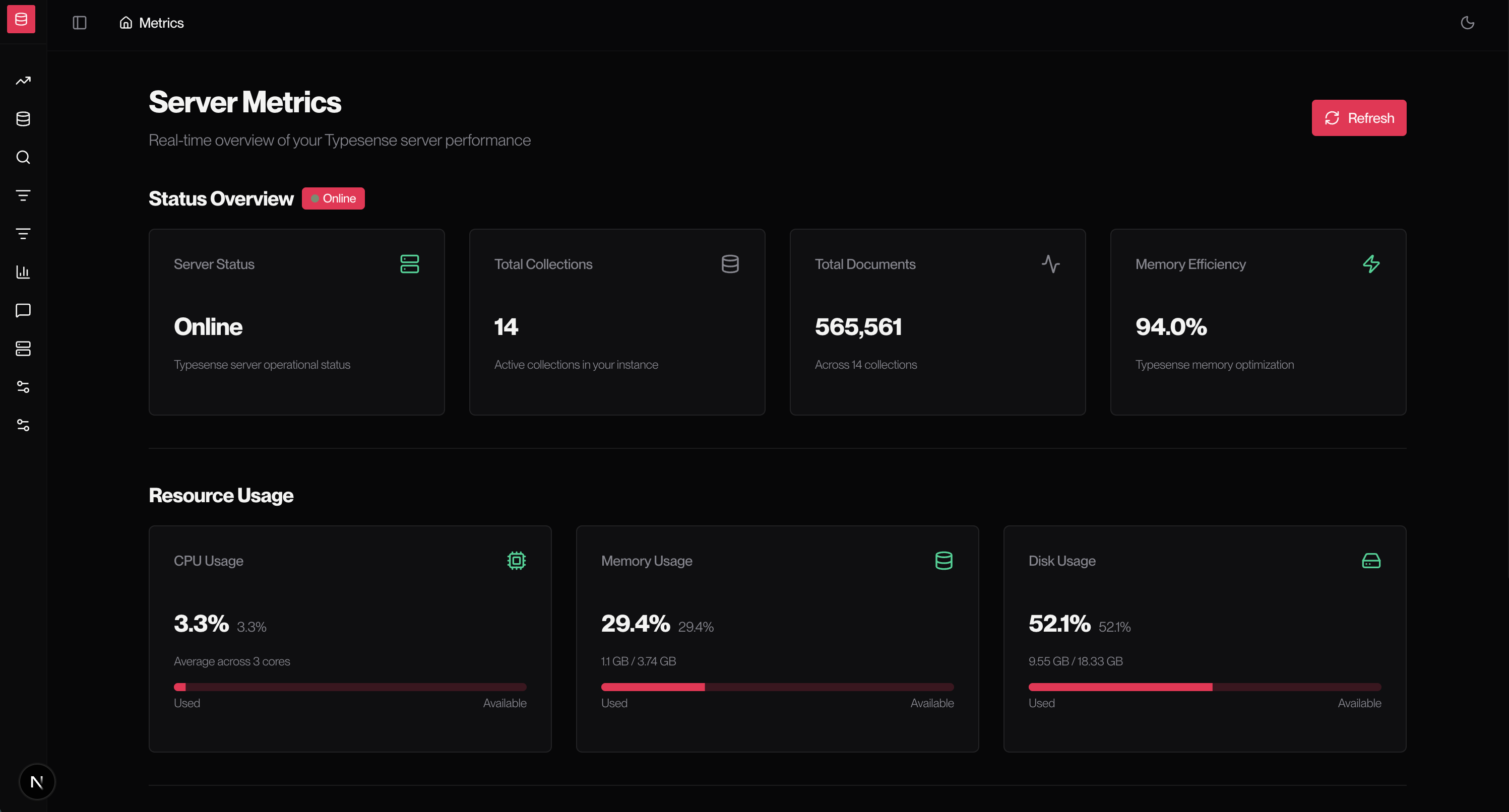
Typesense Dashboard is a full-featured web interface that brings the entire Typesense API to your browser. Manage collections, edit documents, configure search rules, monitor cluster health — all through a clean, intuitive UI that actually makes search infrastructure management... enjoyable?
But this isn't just another CRUD interface. I packed in features that make real-world search operations smooth:
- Monaco Editor (yes, the one from VS Code) for editing documents with syntax highlighting and validation
- Intelligent version gating that detects your server version and shows only compatible features
- Interactive search testing to refine queries with instant feedback
- Zero-downtime deployments with collection aliases
- Natural language search configuration with AI model integration
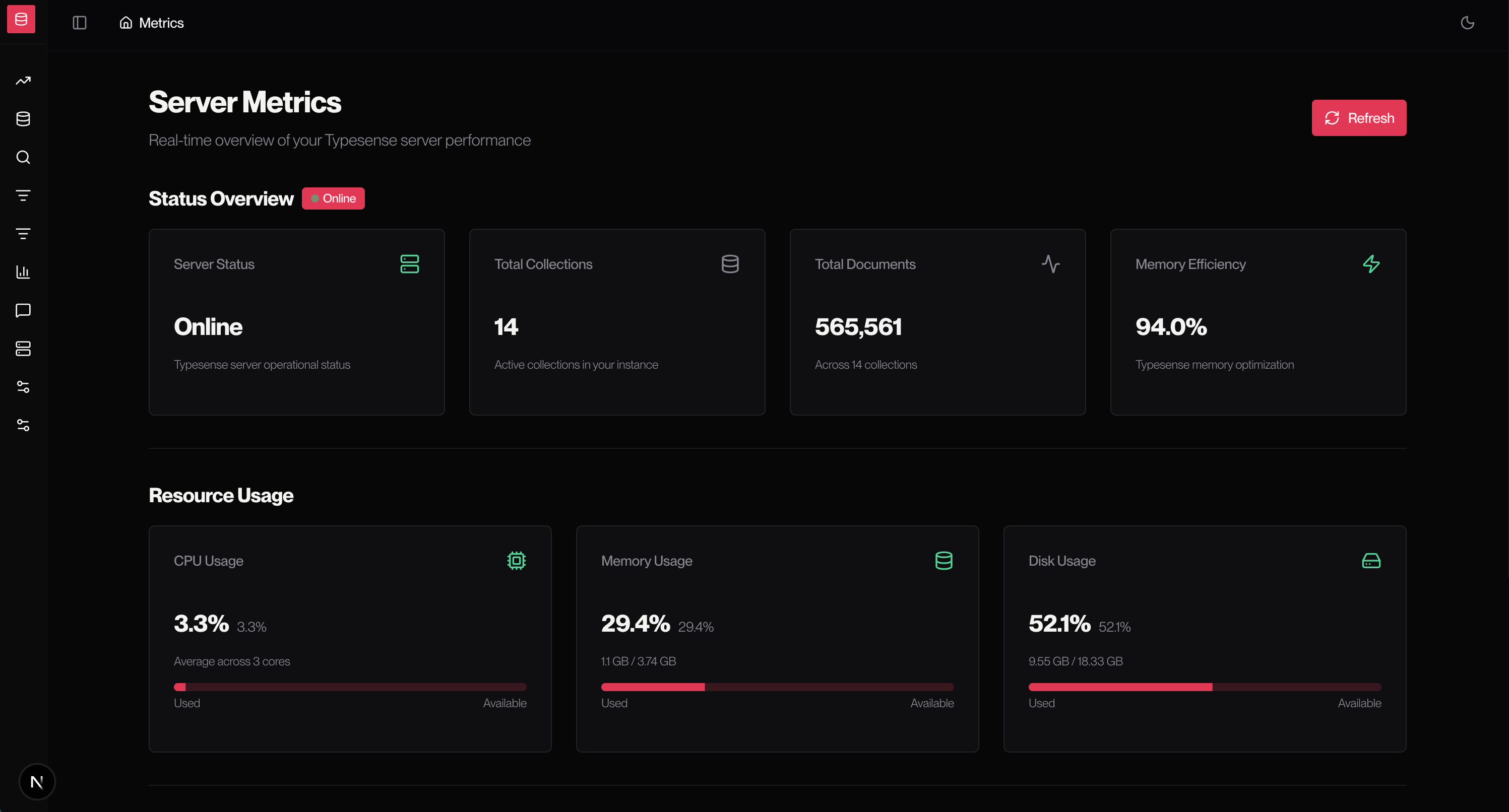
- Real-time metrics with beautiful charts
The Version Gating Challenge
Here's a problem I didn't anticipate: Typesense releases new features across versions. Stopwords came in v27.0. Search presets in v27.1. Conversational search in v28.0. Users on different versions expect different features.
I could've just shown everything and let API calls fail. But that's bad UX. Instead, I built an intelligent version detection system:
// The dashboard detects your server version on startup
export const VERSION_FEATURES = {
  stopwords: '27.0',
  searchPresets: '27.1',
  conversational: '28.0',
} as const;

// And automatically enables/disables features
if (serverVersion >= '27.1') {
  // Show search presets in navigation
}
Running Typesense 27.0? You won't see conversational search in the sidebar. Upgrade to 28.0, and boom — it appears automatically. No confusion, no error messages, just the right tools for your server version.
Technical Wins That Made Me Smile
1. Embedding VS Code in the Browser
Editing JSON documents in a textarea? Barbaric. I wanted VS Code's editor experience. Enter Monaco Editor — the same engine powering VS Code, but embeddable.
The challenge? Monaco is huge (2MB+). Solution? Dynamic imports with lazy loading:
const MonacoEditor = dynamic(() => import('@monaco-editor/react'), {
  ssr: false,
  loading: () => <Skeleton />
});
Now the editor only loads when you actually need to edit a document. First load stays fast.
2. Blue-Green Deployments Made Simple
Changing database schemas is scary. One wrong move and production search goes down. Typesense supports collection aliases — point an alias to one collection, reindex to a new collection with the updated schema, then atomically switch the alias. Zero downtime.
I built a UI that makes this workflow intuitive:
- Create
products-v2with new schema - Reindex data
- Click one button to switch
productsalias fromv1tov2 - Keep
v1around for easy rollback
What was once a nerve-wracking terminal session is now a guided workflow with safety rails.
3. Interactive Search Playground
Testing search queries shouldn't require opening Postman. I built an interactive search interface where you can:
- Type queries and see results instantly
- Adjust parameters (
query_by,filter_by,sort_by) on the fly - View search metadata (processing time, hits found, typo corrections)
- Inspect individual result scores
- Copy queries as curl commands for debugging
It's like having a search lab built into your dashboard. This feature alone has saved me countless hours.
The Stack Behind It
Built with modern tools that make development a joy:
- Next.js 16 with App Router — Server Components by default, client components only when needed
- TypeScript in strict mode — catch errors at compile time, not runtime
- shadcn/ui + Radix UI — accessible, customizable components that look great
- Tailwind CSS v4 — utility-first styling with theme system
- React Hook Form + Zod — type-safe form validation
- Monaco Editor — VS Code experience in the browser
- Recharts — beautiful cluster metrics visualization
- Vitest — fast, modern testing
- Docker — production-ready containers
Deployed on Vercel with automatic preview deployments. Fully open source.
Features That Power Real Workflows
Search Optimization Suite
Fine-tuning search is an art. The dashboard gives you all the tools:
- Search Overrides: Pin specific products to top positions for certain queries
- Synonyms: Map "laptop" to "notebook" for better matching
- Stopwords: Ignore common words like "the" and "and"
- Stemming: Configure custom stemming rules for your domain
- Analytics: Track popular queries and click patterns
AI-Powered Natural Language Search
Typesense v27.1+ supports natural language search with LLMs. The dashboard lets you:
- Configure OpenAI, Anthropic, or other providers
- Customize system prompts for your use case
- Test queries interactively
- See how natural language translates to search operations
"Find me affordable laptops with good battery" becomes a structured Typesense query. Magic.
Collection Management Done Right
- Visual schema builder with field types, faceting, and indexing options
- Bulk document import via JSON/JSONL
- Document browser with pagination, search, and filtering
- Schema migration with aliases for zero-downtime updates
- One-click collection exports and snapshots
Cluster Operations & Monitoring
- Real-time metrics dashboard (CPU, memory, disk, request rates)
- Health status for every node
- Snapshot management for backups
- Cache operations
- Version information
What I Learned
Good UX requires anticipating edge cases. The version gating system came from thinking "what if someone uses this on an older server?"
Developer tools should feel delightful. Small touches like syntax highlighting, instant feedback, and confirmation dialogs compound into something people enjoy using.
TypeScript strict mode is non-negotiable. Every any is a bug waiting to happen.
Server Components are incredible. Fetch data directly in components, no loading states, no useEffect waterfalls. Just clean, fast code.
Open source is rewarding. Seeing others use and contribute to your work hits different.
What's Next?
The dashboard is feature-complete, but there's always room to grow:
- Visual query builder for complex filters
- Bulk operations (multi-select delete, batch edit)
- Role-based access control
- Multi-cluster management
- Audit logs with change tracking
- Webhook configuration
- Custom dashboard widgets
Try It Yourself
Managing Typesense and want a better experience? Try the live demo or check out the code on GitHub.
It works with Typesense Cloud or self-hosted instances. Just plug in your server URL and API key.
Built with Next.js 16, TypeScript, and cutting-edge web technologies
Making Typesense accessible to everyone, one dashboard at a time.
│ │ ├── search-presets/ # Search preset management │ │ ├── settings/ # Application settings │ │ ├── stemming/ # Stemming dictionaries │ │ └── stopwords/ # Stopword management │ ├── api/ # API routes │ ├── connection-error/ # Connection error page │ └── setup/ # Initial setup wizard ├── components/ │ ├── features/ # Feature-specific components │ ├── layout/ # Layout components (header, footer) │ ├── shared/ # Shared utility components │ ├── sidebar/ # Sidebar navigation │ └── ui/ # shadcn/ui components ├── lib/ │ ├── typesense/ # Typesense API wrappers │ │ ├── collections.ts # Collection operations │ │ ├── documents.ts # Document operations │ │ ├── aliases.ts # Alias management │ │ ├── search-overrides.ts # Search curations │ │ ├── synonyms.ts # Synonym management │ │ ├── stopwords.ts # Stopword management │ │ ├── analytics-rules.ts # Analytics configuration │ │ ├── stemming.ts # Stemming dictionaries │ │ ├── nl-search-models.ts # Natural language models │ │ ├── conversations.ts # Conversational search │ │ ├── cluster-*.ts # Cluster operations │ │ ├── version.ts # Version detection & gating │ │ └── typesense-client.ts # Client initialization │ └── utils/ # Utility functions ├── hooks/ # Custom React hooks ├── providers/ # React context providers ├── utils/ # General utilities ├── tests/ # Test files └── public/ # Static assets
## Architecture & Design

### Intelligent Version Gating

One of the most unique aspects of this dashboard is its **automatic feature detection** based on Typesense server version:

```typescript
// lib/typesense/version.ts - Simplified example
export const VERSION_FEATURES = {
  stopwords: '27.0',
  analyticsRules: '27.0',
  stemming: '27.0',
  searchPresets: '27.1',
  nlSearch: '27.1',
  conversational: '28.0',
} as const;

export function isFeatureAvailable(
  feature: keyof typeof VERSION_FEATURES,
  serverVersion: string
): boolean {
  return compareVersions(serverVersion, VERSION_FEATURES[feature]) >= 0;
}
Benefits:
- No confusion about missing features — navigation automatically adapts
- Future-proof as new Typesense features are released
- Clear upgrade path shown to users on older versions
- Prevents API errors from unsupported operations
Component Architecture
Built following atomic design principles with shadcn/ui:
components/
├── ui/              # Atoms: Button, Input, Dialog, etc.
├── shared/          # Molecules: SearchBar, DataTable, FormField
├── features/        # Organisms: CollectionForm, DocumentEditor
└── layout/          # Templates: Header, Sidebar, Footer
Key patterns:
- Server Components by default for better performance
- Client Components only when needed ('use client')
- Composition over configuration — flexible, reusable components
- Controlled forms with React Hook Form + Zod validation
- Optimistic updates for responsive UI
Data Fetching Strategy
Leverages Next.js 16 App Router patterns:
- Server Components: Fetch data directly in components, no loading states needed
- Server Actions: Form submissions, mutations, revalidation
- Route Handlers: API endpoints for client-side fetching
- Caching: Aggressive caching with on-demand revalidation
Example: Collection list page
// Server Component - no useState, no useEffect
export default async function CollectionsPage() {
  const collections = await getCollections(); // Direct server fetch

  return <CollectionsList data={collections} />;
}
Error Handling & Resilience
Graceful degradation at every level:
- Build Time: Dashboard builds successfully even if Typesense is unavailable
- Runtime: Connection errors show friendly error page with troubleshooting steps
- API Errors: Detailed error messages with suggestions for resolution
- Retry Logic: One-click retry buttons on error pages
- Setup Wizard: First-time configuration flow if environment variables missing
Type Safety
Full TypeScript coverage with strict mode:
// lib/typesense/collections.ts
interface CollectionSchema {
  name: string;
  fields: Field[];
  default_sorting_field?: string;
  enable_nested_fields?: boolean;
}

interface Field {
  name: string;
  type: FieldType;
  facet?: boolean;
  optional?: boolean;
  index?: boolean;
}

// Type-safe API wrapper
export async function createCollection(
  schema: CollectionSchema
): Promise<Collection> {
  // Implementation with full type checking
}
Benefits:
- Catch errors at compile time, not runtime
- Autocomplete for Typesense operations
- Self-documenting code
- Refactoring confidence
Technical Highlights
Monaco Code Editor Integration
Editing documents with VS Code's Monaco editor embedded:
- Syntax Highlighting: JSON syntax highlighting for document editing
- Validation: Real-time JSON validation with error markers
- Autocomplete: Schema-aware autocomplete suggestions
- Formatting: Built-in code formatting
- Dark Mode: Theme matches application dark mode
Implementation: Lazy-loaded to avoid bundle bloat, configured with schema validation.
Real-time Search Preview
Interactive search testing with instant feedback:
- Type queries and see results in real-time
- Adjust parameters (query_by, filter_by, sort_by) on the fly
- View search metadata (processing time, hits found)
- Inspect individual result scores and highlighted fields
- Copy queries as curl commands for debugging
Blue-Green Deployments with Aliases
Zero-downtime schema changes workflow:
- Create new collection version (
products-v2) - Reindex data with new schema
- Test new collection thoroughly
- Atomically switch alias (
products → products-v2) - Old version remains for rollback if needed
UI Support:
- Visual alias management interface
- Confirmation dialogs for atomic switches
- Rollback buttons for quick recovery
- Alias history tracking
Docker Multi-Stage Builds
Optimized Docker images with multi-stage builds:
# Stage 1: Dependencies
FROM node:20-alpine AS deps
WORKDIR /app
COPY package.json pnpm-lock.yaml ./
RUN pnpm install --frozen-lockfile

# Stage 2: Build
FROM node:20-alpine AS builder
WORKDIR /app
COPY --from=deps /app/node_modules ./node_modules
COPY . .
RUN pnpm build

# Stage 3: Production
FROM node:20-alpine AS runner
WORKDIR /app
COPY --from=builder /app/.next/standalone ./
COPY --from=builder /app/.next/static ./.next/static
COPY --from=builder /app/public ./public
EXPOSE 3000
CMD ["node", "server.js"]
Result: ~150MB production image vs 1GB+ development image
Testing Strategy
Vitest for unit and integration tests:
- Unit Tests: Utility functions, validation logic
- Integration Tests: API wrappers, Typesense operations
- Component Tests: React components with React Testing Library
- Mocking: Mock Typesense client for isolated tests
Coverage goals:
- 80%+ for critical paths (collection management, search operations)
- 100% for utility functions and validation logic
Use Cases
E-commerce Search Management
Scenario: Managing product search for an online store
- Create collections for products with fields: name, description, price, category, in_stock
- Configure synonyms: "laptop" → "notebook", "mobile" → "phone"
- Set up search overrides to promote featured products
- Use analytics to track popular searches and optimize results
- Monitor cluster health during traffic spikes
Documentation Search
Scenario: Building search for technical documentation
- Import documentation as documents with title, content, category, tags
- Configure stopwords to ignore common words ("the", "and", "of")
- Set up stemming for technical terms
- Create aliases for versioned documentation (
docs-v2,docs-v3) - Test natural language search: "How do I configure authentication?"
SaaS Multi-Tenant Search
Scenario: Separate search collections per customer
- Create collections per tenant with consistent schemas
- Use aliases for customer-facing collection names
- Monitor metrics per collection for billing
- Perform safe schema migrations with zero downtime
- Scale monitoring with cluster operations dashboard
Search Quality Optimization
Scenario: Improving search relevance
- Test queries interactively with search preview
- Analyze which documents rank highest
- Create search overrides to correct poor results
- Add synonyms based on search analytics
- Configure stopwords to filter noise
- Measure improvement with analytics rules
Development Experience
Quick Start
# Clone repository
git clone https://github.com/piyush-gambhir/typesense-dashboard.git
cd typesense-dashboard

# Install dependencies
pnpm install

# Configure connection (option 1: env variables)
cp .env.example .env.local
# Edit .env.local with your Typesense credentials

# Start development server
pnpm dev
First-time setup: If no credentials are configured, you'll be redirected to an interactive setup wizard at /setup.
Available Commands
pnpm dev          # Dev server with Turbopack (fast)
pnpm build        # Production build
pnpm start        # Production server
pnpm lint         # ESLint checking
pnpm test         # Run tests with Vitest
pnpm test:watch   # Watch mode for tests
pnpm clean        # Clean build artifacts
Environment Setup
Minimum required variables:
TYPESENSE_HOST=localhost
TYPESENSE_PORT=8108
TYPESENSE_PROTOCOL=http
TYPESENSE_API_KEY=your-admin-key
Optional for production:
NEXT_PUBLIC_APP_URL=https://your-domain.com
NODE_ENV=production
Local Typesense Setup
Docker (recommended):
docker run -d \
  -p 8108:8108 \
  -v /tmp/typesense-data:/data \
  typesense/typesense:27.1 \
  --data-dir /data \
  --api-key=development-key
Or use Typesense Cloud for managed hosting.
Code Style & Quality
- Prettier: Automatic formatting on save
- ESLint: Next.js recommended rules + custom rules
- TypeScript: Strict mode with no implicit any
- Import Sorting: Organized imports with prettier-plugin-sort-imports
- Git Hooks: Pre-commit checks with Husky
Pre-commit checks:
- Format code with Prettier
- Lint with ESLint
- Type check with TypeScript
- Run tests on changed files
Development Tools
- React DevTools: Debug component tree and props
- TypeScript Language Server: Autocomplete and type checking
- Tailwind CSS IntelliSense: Class name autocomplete
- Vitest UI: Interactive test runner interface
Deployment
Vercel (Recommended)
One-click deployment optimized for Next.js:
npm i -g vercel
vercel
Configuration:
- Set environment variables in Vercel dashboard
- Automatic deployments on git push
- Preview deployments for pull requests
- Edge Functions for global performance
Docker Production
Build and run:
docker build -f Dockerfile.production -t typesense-dashboard .
docker run -p 3000:3000 \
  -e TYPESENSE_HOST=your-server \
  -e TYPESENSE_API_KEY=your-key \
  typesense-dashboard
Docker Compose:
docker-compose -f docker-compose.prod.yml up -d
Self-Hosted
Requirements:
- Node.js 20+
- Process manager (PM2, systemd)
- Reverse proxy (nginx, Caddy)
- SSL certificate (Let's Encrypt)
Build and start:
pnpm build
pnpm start
PM2 example:
pm2 start npm --name "typesense-dashboard" -- start
pm2 save
pm2 startup
Performance Optimization
Built-in optimizations:
- Server Components for zero JS on initial load
- Automatic code splitting by route
- Image optimization with next/image
- Font optimization with next/font
- Static page generation where possible
- Edge caching with CDN
Bundle analysis:
ANALYZE=true pnpm build
Challenges & Learnings
Challenge: Version Compatibility
Problem: Typesense adds features across versions, but API calls to unsupported endpoints fail.
Solution: Built version detection system that:
- Fetches server version on startup
- Compares against feature requirements
- Dynamically hides incompatible features
- Shows upgrade prompts where appropriate
Challenge: Connection Reliability
Problem: Dashboard build would fail if Typesense server was unavailable.
Solution: Graceful degradation:
- Build succeeds even without server connection
- Runtime connection testing with friendly error pages
- Retry mechanisms without full page reload
- Setup wizard for first-time configuration
Challenge: Complex Form Validation
Problem: Collection schemas have complex validation rules (field types, required fields, naming constraints).
Solution: Zod schemas with custom validation:
const collectionSchema = z.object({
  name: z.string()
    .min(1)
    .regex(/^[a-zA-Z0-9_-]+$/, 'Only alphanumeric, dash, underscore'),
  fields: z.array(fieldSchema).min(1),
  default_sorting_field: z.string().optional()
    .refine(val => !val || fields.some(f => f.name === val))
});
Challenge: Monaco Editor Bundle Size
Problem: Monaco Editor added 2MB+ to bundle size.
Solution: Dynamic import with lazy loading:
const MonacoEditor = dynamic(() => import('@monaco-editor/react'), {
  ssr: false,
  loading: () => <Skeleton />
});
Result: Only loaded when actually editing documents.
Future Roadmap
Planned Features
- Visual Query Builder: Drag-and-drop interface for complex queries
- Bulk Operations: Multi-select for batch edits and deletes
- Import/Export: JSON export of collections, documents, configurations
- Audit Logs: Track all changes with user attribution
- Webhooks: Configure webhooks for events (document created, search performed)
- Custom Dashboards: Drag-and-drop dashboard widgets
- Multi-Cluster: Manage multiple Typesense clusters from one interface
- Performance Profiling: Slow query detection and optimization suggestions
- Role-Based Access: User roles with granular permissions
- Scheduled Tasks: Cron jobs for snapshots, reindexing, maintenance
Recently Completed
- Natural Language Search integration (v27.1+)
- Conversational Search support (v28.0+)
- Dark mode with system preference detection
- Monaco Editor for document editing
- Docker production deployment
- Interactive setup wizard
- Recharts-based metrics visualization
Getting Started
Ready to experience modern Typesense management? Try the live demo or explore the source code on GitHub to see how it's built.
Installation is simple:
git clone https://github.com/piyush-gambhir/typesense-dashboard.git
cd typesense-dashboard
pnpm install
pnpm dev
Configure your Typesense connection via environment variables or use the interactive setup wizard on first launch.
Contributing & License
This project is MIT licensed and open to contributions. Whether you're fixing bugs, adding features, improving documentation, or suggesting enhancements — all contributions are welcome!
Areas for contribution:
- Additional Typesense feature support
- UI/UX improvements
- Performance optimizations
- Documentation and examples
- Testing coverage
- Internationalization
Acknowledgments
Built with modern tools and standing on the shoulders of giants:
- Typesense — The lightning-fast search engine that makes this all possible
- Vercel & Next.js Team — For the incredible React framework and deployment platform
- shadcn — For the beautiful, accessible component system
- Radix UI — For unstyled, accessible primitives
- Tailwind Labs — For the utility-first CSS framework
Built with Next.js 16, TypeScript, and cutting-edge web technologies
Making Typesense accessible to everyone, one dashboard at a time.